
Shipping products with confidence often plays a part in a customer's choice for delivery. One of the more popular carriers that has earned a reputation for dependable on-time delivery of recent years is Federal Express. They cover both domestic and international delivery of packages and letters. The following tutorial explains how to install and configure the Fedex shipping extensions in OpenCart 1.5.
The options for shipping in OpenCart depend upon the extensions that you enable in the Administrator Dashboard. Federal Express is a reputable carrier that serves both for shipping domestic and international markets, so it is often a carrier that your customers may seek. Available services are affected by location, as some locations may not have all of the services available from Fedex. Be sure to clearly indicate this to your customers in your installation by properly making these choices available to them within the configuration options.
Credit: webhostinghub.com, Click to learn more for OpenCart
Installing the Federal Express Shipping Extension in OpenCart 1.5
- Step 1. Login to the Administrator Dashboard.
- Step 2. Hover over the menu bar where it reads EXTENSIONS and then click on SHIPPING when it appears in the drop-down menu. You will see the following screenshot (or something similar):
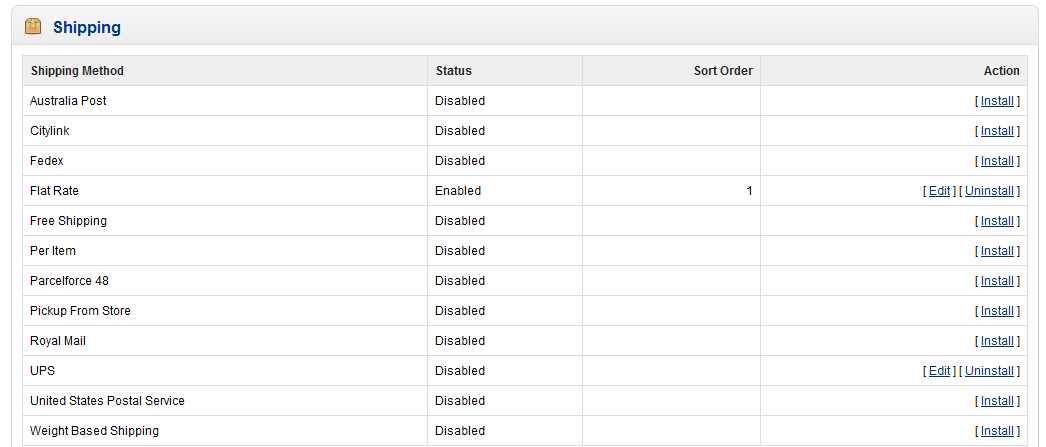
The FEDEX option is third down from the top of the table listing for the shipping options. The extension is loaded when OpenCart is installed, but it remainds disabled until you install and configure it. Click on INSTALL in the right hand column in order to start the installation procedure. - Step 3. When the installation procedure is complete there will be two new options in the ACTION column: EDIT and UNINSTALL. Click on EDIT and you will see the following configuration screen for the FEDEX extension:
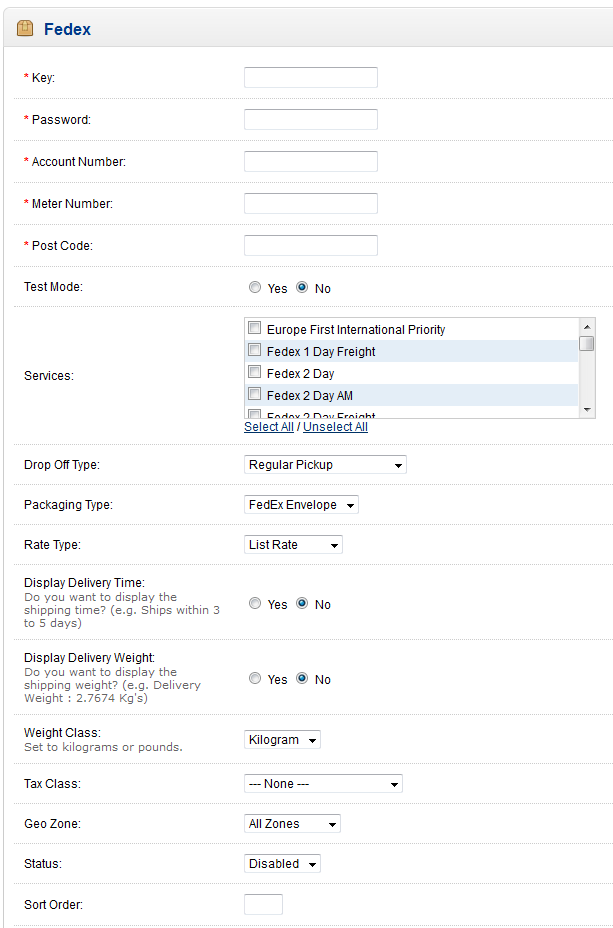
You will need to have a FEDEX Account in order to complete the installation for the FEDEX extension. Please go the Federal Express website in order to register for a new account.
The following table reviews of the configuration options from above:Key Key obtained from the Fedex account Password Passoword set for the Fedex account Account Number Account number for the Fedex account Meter Number Meter number from Fedex account Post code Postal code/Zip Code Test Mode Sets extension in test mode to test plugin Services List of Available Fedex services based on location Drop Off Type Describes drop off available for packages being shipped Packaging Type Describes the packaging used Rate Type Either List Rate or Account Rate Display Delivery Time Option to show when the package will be delivered Display Delivery Weight Option to show weight of package being delivered Weight Class Option to show the weight as kilograms, grams, pounds or ounces Tax Class Taxable goods or downloadable products Geo zone Geographical zone set as per taxes Status Option to enable or disable FEDEX Shipping extension Sort Order Allows you to determine where the Fedex shipping option is listed
Note that a good portion of the beginning information will need to come from your FEDEX account. Contact Fedex if you have any questions or are having issues with the information for the extension. - Step 4. Once you have completed the configuration form for the Fedex shipping extension, make sure to click on SAVE in the top right hand corner of the screen in order to save your entries.
The options for shipping in OpenCart depend upon the extensions that you enable in the Administrator Dashboard. Federal Express is a reputable carrier that serves both for shipping domestic and international markets, so it is often a carrier that your customers may seek. Available services are affected by location, as some locations may not have all of the services available from Fedex. Be sure to clearly indicate this to your customers in your installation by properly making these choices available to them within the configuration options.
Credit: webhostinghub.com, Click to learn more for OpenCart
0 Comments